
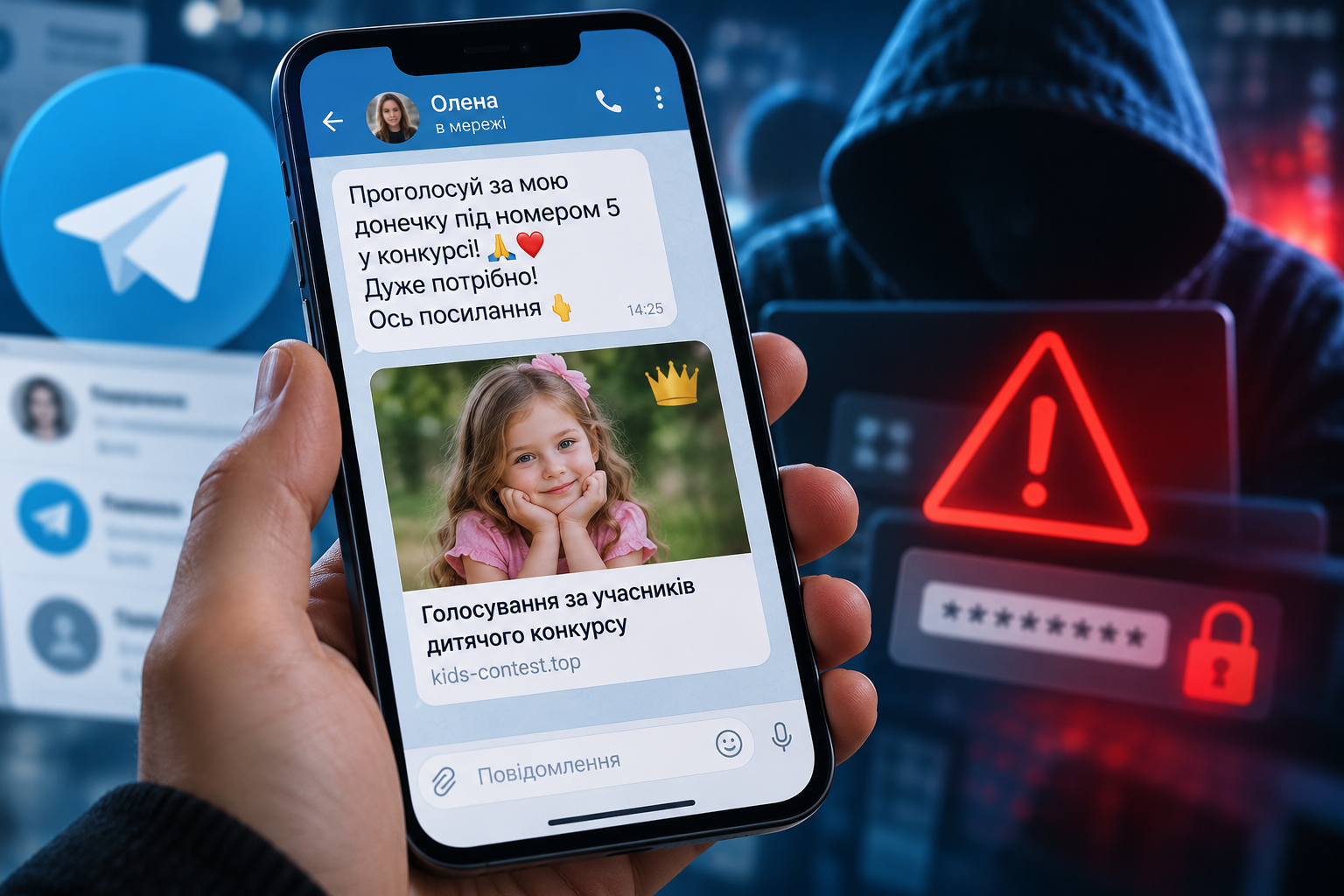
A seemingly ordinary message from a contact on Telegram could be the start of a scam. «Vote for my daughter in the competition», «Lend me 2,000 hryvnias by tomorrow», «You’ve been awarded state benefit» or «Have a look, is that you in the video?» — such requests, which seem harmless at first glance, sometimes conceal attempts to steal your account, personal data or money. A distinctive feature of modern online fraud is that criminals do not always need to breach complex security systems. Often, it is enough to persuade a person to visit a fake website themselves, provide a verification code or transfer funds. We’ll break down the most common scams on Telegram, Viber, WhatsApp and social media, explain how to spot them, and what to do if your account has already fallen into the wrong hands.
- A message asking you to vote for a child may lead to a phishing website designed to hijack your account.
- Hacked accounts are used to send out new scam messages and trick acquaintances out of their money.
- Fraudsters pose as banks, government agencies, delivery services and messaging app support teams.
- Fake job adverts, scams, QR codes and files from unknown senders can be dangerous.
- Two-factor authentication, monitoring of active sessions and vigilance regarding login requests all help to protect your account.
How the «Vote for my daughter» scam works»
Imagine this scenario: you receive a message from an old acquaintance, a colleague or a relative. The message contains a photo of a child and a request to support them in a competition. Apparently, all you need to do is follow the link and click the ‘vote’ button. They aren’t asking for any money, so the message doesn’t raise any particular suspicions.
That is precisely what it is based on diagram. People trust not so much the website as the friend on whose behalf the request is being made. However, the actual owner of the profile may not even realise that messages are being sent from their account.
When you click on the link, a page opens that looks very much like a children’s competition website. It may feature photographs of the entrants, a vote counter, a ‘support’ button and a message asking you to verify your identity.
At a certain point, the user is prompted to log in via Telegram. To do this, they may ask for your telephone number, a verification code or authorisation to log in. It is at this stage that the risk arises.
If a person provides attackers with the details required for authorisation, they may gain access to their account. The fraudsters then use the compromised account to send similar requests to other contacts.
In this way, a single compromised account becomes a tool for the further spread of fraud. The Ukrainian Cyber Police had previously issued an official warning about a scheme in which hacked profiles are used to send out phishing links under the pretence of voting for a child.
Is it possible to lose access to Telegram simply by clicking on a link?
It is important to distinguish between simply visiting the website and the user’s subsequent actions. Simply opening a phishing page does not necessarily lead to an account being compromised.
More often than not, fraudsters need to obtain further information or persuade someone to carry out a specific action. For example, to enter an authorisation code, confirm a suspicious login, scan a special QR code or install an unknown programme.
However, there are also technical risks. Malicious web pages may attempt to exploit vulnerabilities in outdated browsers or operating systems. It is therefore best not to open suspicious links at all, and to update your software regularly.
It is particularly dangerous to enter a code received in a message via Telegram or by text message. Such codes are intended for a specific authentication process, not for taking part in children’s competitions, receiving gifts or having your identity verified by a third-party website.
The main rule is: if you haven’t initiated a login to your account, do not confirm it and do not share the code you have received with anyone.
The «Borrow money until tomorrow» scam: when an acquaintance isn’t actually messaging you
This is one of the simplest ways to make money from hacked accounts. Once they have gained access to someone else’s Telegram, Viber or other messaging app, fraudsters start contacting the account holder’s contacts, asking them to transfer money urgently.
The message usually sounds quite ordinary: the person claims they are unable to use their own card, have found themselves in an unexpected situation, or urgently need a small amount of money. To make it sound more convincing, fraudsters may use the name, photograph and even the communication style of the actual account holder.
Sometimes fraudsters look through existing correspondence in advance to find out how people address one another, what they have recently been discussing, and what sort of relationship they have. This enables them to create a message that is more difficult to distinguish from a genuine one.
Another sign of fraud may be a request to transfer money to an unfamiliar bank card. However, even a familiar recipient’s name does not guarantee that the payment is secure.
The best way to check a request is to ring the person on this number, whom you knew previously, or contact her by some other independent means. You should not rely solely on messages in that same chat, as the person replying may be a fraudster.
Fake state benefits, compensation and social assistance
Fraudsters are actively exploiting topics that are of interest to a large number of Ukrainians: state aid, compensation for damaged homes, pension payments, support for internally displaced persons and financial assistance from international organisations.
Messages claiming that registration for a new payment scheme is now open are usually circulated via Telegram, Viber or social media. People are urged to click on the link immediately and fill in a form, otherwise they will supposedly miss out on the chance to receive the money.
A fake website may mimic the design of a government portal, a bank or a well-known charity. It asks you to enter your personal details, your bank card number and, in some cases, its expiry date, CVV code and one-off password.
To receive a legitimate payment, you should not enter your confidential bank details on a random website, the link to which was sent via a messaging app. Information about government schemes should be checked directly on the official websites of the relevant authorities, rather than via advertisements or anonymous channels.
It is worth bearing in mind that the mere presence of the national coat of arms, a bank’s logo or the words «Official assistance» does not confirm the authenticity of a website. Fraudsters can easily copy such elements.
Fake messages from the bank: «Your account will be blocked»
Another common scam preys on the fear of losing money. The user receives a message purporting to be from their bank, alerting them to a suspicious transaction, a card being blocked, or the need to reconfirm their personal details.
They then ask you to press a button, follow a link or contact a «security officer». Fraudsters may claim that only by following their instructions immediately can you stop unauthorised debits.
In fact, the aim of such contact may be to gain access to mobile banking. Criminals try to find out one-off codes, passwords and card details, or to persuade the person to confirm the transfer themselves.
Sometimes a fraudster will claim to be a representative of the bank’s security department and ask you to temporarily transfer money to a «secure account». Such a request is a clear sign of fraud.
If you have received a message like this, open the official banking app yourself or call the number shown on your card or on the institution’s official website. Do not use the contact details provided in the suspicious message.
Delivery scams: when a buyer receives a fake link
Dangers can arise even when simply selling items online. A person places an advert on a marketplace, after which a potential buyer contacts them. The buyer claims to have already arranged delivery or paid for the goods, and tells the seller that all they need to do is click on a link to receive the money.
A fake webpage may be designed to look like a well-known delivery service or e-commerce platform. It asks you to enter your bank card details, supposedly to credit your account. In some cases, you are also asked to confirm the transaction using a one-time code.
The danger lies in the fact that the user thinks they are receiving payment, when in reality they may be providing fraudsters with information that allows them to make unauthorised debits.
The scam also works the other way round. The seller offers goods at an attractive price, receives an advance payment, and then stops responding. To minimise the risk, you should use the built-in payment methods of reputable trading platforms, avoid being redirected to third-party payment pages, and verify the seller before transferring any money.
Fake job adverts: earning money for likes, views and hotel bookings
A message about flexible remote working may also form part of fraudulent scheme. People are offered the chance to ‘like’ posts, rate products, leave reviews or carry out simple tasks on hotel websites every day. They are promised prompt payment with no experience, interviews or formal employment required.
At first, the fraudsters may actually transfer a small payment. This gives the impression that the scheme is legitimate. After a few successful tasks, the participant is offered the chance to move up to a higher earning tier, but to do so, they must invest their own money.
For example, a person is told that, in order to carry out a new task, they must pay for a hotel booking or temporarily top up their internal account. Initially, the funds deposited are sometimes returned with a small bonus. However, the amounts gradually increase, and additional payments are then demanded in order to withdraw the earnings.
The Ukrainian Cyber Police have described precisely this type of scam. A key warning sign is a demand to pay your own money in order to receive payment for your work. Legitimate employment should not depend on transfers to unknown private accounts.
«You’ve been given Telegram Premium as a gift»: fake gifts and prize draws
Fraudsters may exploit the popularity of paid features on messaging apps. Users receive a message claiming they have been gifted a Telegram Premium subscription, have won a competition, or are entitled to a special bonus that must be activated within a limited time.
It is important to realise, however, that genuine gifts, promotions and prize draws do exist. The mere fact that a free subscription is offered does not in itself prove that it is a scam. The danger arises when, in order to receive a gift, a person is redirected to a third-party website where they are asked to provide a login code, password or other confidential information.
Sometimes users are also asked to pay a small fee. Once their bank details have been entered, the fraudsters may attempt to make a debit or use the information obtained for other transactions.
Telegram gifts should only be claimed via the official app and its built-in features. If an unfamiliar bot or website asks you to log in again to claim a prize, this is a reason to stop the process and check the authenticity of the offer.
Fake customer support for Telegram and other services
Sometimes, cybercriminals make no attempt to conceal their aim — to gain access to an account. Instead, they pose as support staff and claim that the account is at risk of being suspended due to complaints, breaches of the rules or suspicious activity.
To make their scam seem more convincing, they use names such as «Security», «Telegram Support» or «Account Verification», along with the messaging app’s logos and messages designed to look like system notifications.
The user is then asked to complete a verification process. Depending on the scheme, this may involve entering a code, providing a two-factor authentication password or scanning a QR code. In reality, such actions could grant unauthorised third parties access to the account.
You should check for official notifications about a new account directly within the app. You shouldn’t trust a profile simply because its name includes the word ‘Telegram’ or because it has a profile picture featuring the service’s logo.
Dangerous QR codes: how you might accidentally authorise someone else to log in
QR codes are used for making payments, viewing menus, visiting websites and logging in. They are not dangerous in themselves, but fraudsters may tamper with them or send them under false pretences.
QR codes linked to logging into Telegram and other services require particular attention. In a legitimate process, they can be used to link an additional device to an account.
If a cybercriminal persuades a user to scan someone else’s authorisation code and confirm their login, this could result in an unauthorised session being established on their account. The user may mistakenly believe that they are simply voting in a competition, confirming a gift or verifying a document.
There is another risk: a QR code may open a phishing website. Such incidents have even been reported involving counterfeit payment codes on parking meters.
You should therefore check the web address before opening a page, and assess any request for authorisation on a case-by-case basis. Never authorise an unknown device to connect just for the sake of a third-party competition or promotional offer.
«Is that you in the video?»: dangerous files and fake messages
Fraudsters may send intriguing messages containing photographs, videos or attachments. For example, a user might receive a message claiming there is a compromising video featuring them, or a document that needs to be viewed urgently.
The aim may be to redirect the user to a phishing page or to install malware. Unknown executable files, Android installation packages and documents that require the execution of unfamiliar commands or the granting of permissions pose a particular risk.
Sometimes malware is disguised as a browser update, an antivirus programme, a video player or a specialised application for viewing a received file.
Not every attachment in a messaging app poses a threat, but you shouldn’t download software from random chat rooms. If you need to update the app, it’s best to do so via the official app store or the developer’s website.
Fake voice messages and video calls: how fraudsters are using AI
Advances in artificial intelligence have opened up new possibilities for online fraud. Criminals can create fake audio recordings that mimic the voice of someone the victim knows, or use manipulated video footage to make their scams more convincing.
For example, after receiving a request to transfer money, a person has their doubts and asks for voice confirmation. In response, they are sent a recording in which the voice sounds like that of a friend or relative.
The Ukrainian Cyber Police warns that deepfake technology can be used to extract money, personal data and access to digital resources.
Therefore, even a voice message or video call is not always sufficient proof of identity. When money or confidential information is involved, it is advisable to contact the person yourself using a number you know. If necessary, you can ask a question that only the two of you know the answer to, although this method is not a foolproof safeguard either.
Fraudulent investments, cryptocurrency and guaranteed returns
On Telegram and social media, you can come across channels that promise quick profits from cryptocurrency, foreign exchange trading or investment schemes. Their administrators often display screenshots of large payouts, reviews from supposedly satisfied customers and profitability charts.
A common scam involves setting up a fake investment account. After depositing money, the user sees their balance supposedly increase. However, when they try to withdraw funds, they are asked to pay an additional commission, tax or «verification» fee.
Sometimes fraudsters maintain long-term personal contact, gradually building trust. They may persuade a person to invest increasingly large sums until they try to get their money back.
All investments involve risks, but the promise of a guaranteed high return with no possibility of loss is a serious warning sign. Before transferring any money, you should check the company, its legal status and the terms and conditions governing the use of the funds.
Replacing a SIM card without the owner’s knowledge: how fraudsters can take over a number
Not all attacks start in a messaging app. Sometimes cybercriminals try to gain control of a person’s phone number so they can use it to regain access to other services.
One way is fraudulent reissue SIM cards or number porting. If this is successful, the genuine owner may suddenly lose mobile connectivity, whilst the attacker is able to receive calls and text messages sent to that number.
The risk is particularly high if an SMS can be used to regain access to an email account, a banking app or a messaging service. At the same time, simply having control over the number does not always allow you to bypass additional passwords and other independent security measures.
To minimise the risk, you should check with your mobile operator whether additional security measures can be put in place for transactions involving your mobile number. If your SIM card suddenly stops working, you must contact your operator immediately and, if there is a risk to your bank accounts, contact your bank as well.
How to tell if a message has been sent by a fraudster
There is no single tell-tale sign that allows you to identify a fraudulent message with absolute certainty. Fraudsters are constantly changing the wording, website design and methods of communication. However, most of the schemes described share a common feature: they try to pressure people into acting quickly, leaving no time to verify the information.
Reports that display several of the following characteristics at the same time require particular attention:
-
You’re being rushed: the money, prize or access to your account will supposedly disappear in a few minutes.
-
They ask you to provide a code from an SMS or messaging app, or your account password.
-
You are asked to visit an unfamiliar website in order to receive a payment or confirm your vote.
-
They demand an advance payment or a commission in order to receive the money.
-
They ask you to transfer money to an unfamiliar card, even if they’re writing on behalf of a friend.
-
They suggest installing a third-party programme to «check security».
-
They promise a guaranteed high income with virtually no effort.
However, the absence of these signs does not guarantee safety. For example, a well-crafted fraudulent message may contain no errors, look professional and appear to come from a genuine but compromised account.
How to protect Telegram from being hacked: settings you should check
Telegram has built-in security features, but some users do not use them or are not even aware that they exist.
First of all, you need to set up two-step verification. To do this, open Telegram, go to «Settings», select «Privacy and Security», and then «Two-step verification». The system will prompt you to set up an additional password, which you’ll need to log in on new devices.
Your password must be unique. You should not use your date of birth, your own name or a combination that you already use for your email. It is also advisable to set up a recovery email address and protect your email account itself with two-factor authentication.
The next step is to check your active sessions. In Telegram, go to «Settings» → «Devices». Here you can see the devices that have been used to log in to your account.
If there is an unfamiliar device or session in the list that you cannot account for, you should end it. If necessary, you can use the ‘End other sessions’ function. Please note that for newly authorised devices, Telegram may temporarily restrict access to older sessions.
It is also recommended that you set a passcode for the app itself, update your operating system regularly and use the official messaging app clients. It is also a good idea to check the settings regarding the visibility of your phone number and third-party access to your profile information.
These measures make unauthorised access considerably more difficult, although no security system can guarantee absolute security.
What to do if you have already clicked on a fraudulent link
What you should do next depends on exactly what happened. If you have simply opened a suspicious page but haven’t entered any details, downloaded anything or confirmed anything, this does not necessarily mean that your account has been compromised.
In this case, you should close the page, check your account’s active sessions and ensure that your system and browser are up to date. If your device is behaving unusually or a suspicious file has downloaded automatically, it is advisable to run a malware scan.
Another scenario is if you have entered a Telegram authorisation code or confirmed an unknown login. In that case, you should immediately open the list of devices and end any unfamiliar sessions. After that, check your two-step verification and your recovery email address.
If you have installed an unknown app, do not enter any passwords or use banking apps within it until you have checked the device. It is particularly important to check apps that have been granted access to accessibility features, notifications or other sensitive functions on your smartphone.
If you have entered your bank details, CVV code or mobile banking password on a fraudulent website, you should immediately contact your bank via an official channel and ask them to block any compromised payment methods and access.
What to do if fraudsters have already hacked your Telegram account
First of all, you need to check whether you still have access to your profile on at least one of your devices. If Telegram is still open on your phone or computer, don’t rush to log out of all sessions yourself.
Try ending any unauthorised connections via the «Devices» menu, set up an additional password and check your email address to regain access. If an unauthorised person has already set their own password or changed the settings, your ability to manage your account may be restricted.
The next important step is to warn your friends. It is best to do this via a different messaging app, by phone or on social media. Let them know that they may receive requests in your name to transfer money, vote in a competition or click on a suspicious link.
If you have completely lost access to your account, you should follow Telegram’s official recovery procedures and contact the service’s support team. You should not trust random intermediaries who promise to restore your account in return for payment.
Particular attention should be paid to information stored in messages. If Telegram contained passwords, photographs of documents, confidential information or bank details, you need to assess the risk of these being disclosed. Compromised passwords should be changed, and the relevant authorities notified if necessary.
Deleting an account should only be considered as a last resort, as it results in the loss of data and does not guarantee the recovery of information that has already been stolen.
Where to turn if you have fallen victim to online fraud
If fraudsters have stolen funds, gained access to your account or used your details for unauthorised transactions, you must document the circumstances of the incident.
Save screenshots of messages, the address of the fraudulent website, telephone numbers, transfer details, dates and any other information that may assist the police. Do not delete any important correspondence until you have saved the evidence.
You can report a cyber incident via the official channels Cyberpolice Department The National Police of Ukraine. If the matter concerns a criminal offence, you can also call 102 or go to your nearest police station to file a report.
If your bank accounts have been affected, you should contact your bank at the same time. A swift response is important, as the financial institution can take steps to protect your account and investigate any suspicious transactions. However, the return of your money depends on the specific circumstances and is not guaranteed.
Why even careful users can fall victim to scammers
Modern online fraud relies not only on technical tools, but also on an understanding of human behaviour. Criminals exploit people’s trust in their friends, their desire to help a child, their fear of losing money, their curiosity and their eagerness to take advantage of a good deal.
Messages sent from the genuine accounts of people you know can be particularly convincing. You see a familiar name and photo, so you might not realise that someone else is actually behind them.
That is precisely why effective protection consists of two parts. The first is technical: additional passwords, session verification, software updates and device security. The second is behavioural: the habit of independently verifying unusual requests and not disclosing confidential information to unauthorised persons.
If a message urges you to click on a link, transfer money or confirm your login immediately, first check exactly who is asking you to do this and why. Taking a few minutes to check can prevent you from losing your account, personal details and savings.