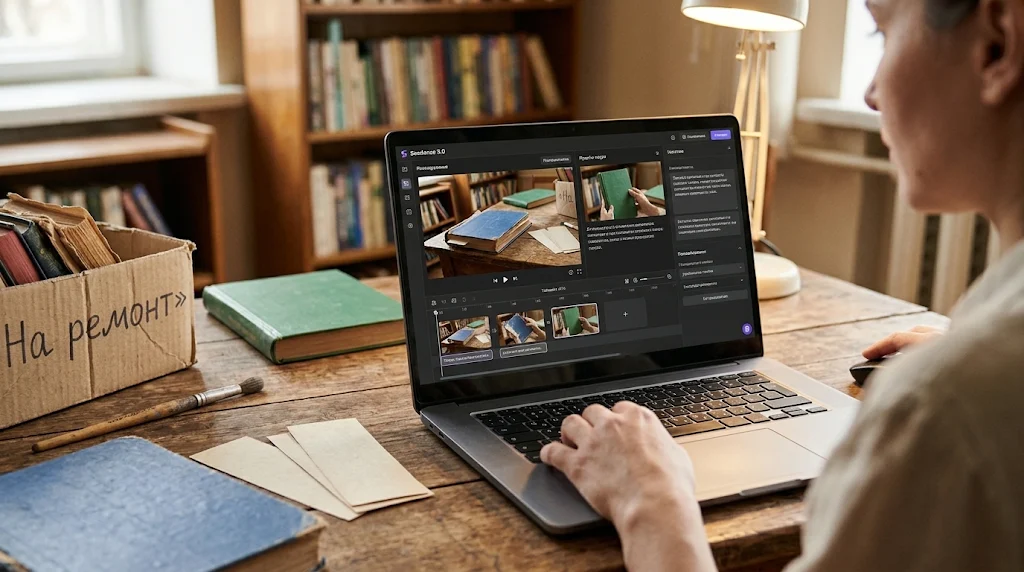
On the edge of the table lies a book with its cover torn off. Next to it are three paper bookmarks, a small brush and a box of books awaiting repair. I want to begin a short video about an imaginary workshop at the local library with this shot. The viewer should immediately realise that the work being carried out on the table involves the routine repair of damaged books. Throughout the video, one book will change position, and the entire storyline can be followed through this movement.
For this video, I need a simple explanation of exactly what a person will see if they visit the workshop. I plan to show how a librarian examines the spine, sets one book aside for work and returns another to the shelf. The two books will be different colours so that they can be easily distinguished during editing. The duration will depend on how long it takes the viewer to observe the hands and understand how the beginning and the end are connected.
Start with the mark that can be seen up close
Instead of a wide shot of the room, I’ll focus on the worn corner of the blue cover. At first, only this corner and the tip of a paper bookmark are visible in the frame. Then a hand gently lifts the edge, and it becomes clear that the book is coming away from the cover. For a standard introduction in a library video, this is a minor detail. Here, it explains why the book was brought to the table. Towards the edge of the frame, I’ll leave space for the workshop’s short name, which I’ll add during editing.
The following will help you check this idea Seedance 3.0. I can use my own photograph of a damaged book as the basis for the frame and describe the movement of the hand in a few sentences. If I have a separate recording of a person picking up a book from a table, I’ll add it as a guide for the pace. That brief pause after touching the paper is important to me. It allows the viewer to notice the damage first, and only then follow the movement of the hand.
Choose an angle where your hands do not cover the spine
For my first test shot, I’ll take two photos of the same table. In one, the camera is positioned almost vertically, so it’s easy to arrange the objects in different parts of the frame. In the second, it’s positioned slightly lower, so you can see the thickness of the book and the shadow beneath the cover. This lower angle might prove more compelling for the introduction. At the same time, my fingers here easily block the part I want to show. I’ll immediately position the book diagonally and leave a gap at the side for my hand.
In the test with Seedance 3.0 Please keep the camera still and turn the book just enough for the spine to become visible in the light. If the edges of the pages move along with the cover and the damage becomes indistinct, I’ll simplify the task. In the first shot, I’ll focus on a single action: lifting the edge. The turning of the page can be shown separately, after a brief cut, and then both moments will have sufficient time. During the actual shoot, it will also be easier for me to repeat a single small movement.
Guide the viewer from the table to the shelf
In the middle shot, I want to show two books side by side. The blue one remains on the table, whilst the green one is ready to be returned to the readers. During filming, I’ll position them so that the blue one remains visible right up until the very last moment, when the hand is already picking up the green one. The green one can be moved to the bookshelf in the next shot. Its colour should be clearly visible both in daylight by the table and in the shade between the shelves. This is a simple way to maintain continuity between shots, even if the viewer is watching the video without sound.
To set the scene, I’ll prepare a short reference sequence showing movement from the table to the bookcase. I’ll film it in an empty room and ask that only slow, measured steps be used, without any precise spatial geometry. A photograph of the relevant shelf will provide another layer of reference. In the text for Seedance 3.0, I’ll describe at what height the book is held and when it comes into the frame. If the movement gives the impression of a long corridor, you can start closer to the shelf. The transition itself is important to the narrative, and the viewer will easily imagine the space between the furniture.
I’ll mark the exact spot where the pages are glued together on the frame where the green cover is almost touching the edge of the table. The continuation near the shelf will start from a similar angle of the cover. This way, the hand’s movement can be divided into two segments, and the book will remain visible in both. For this test in Seedance 3.0, it’s best to leave only the necessary items on the table. A shiny pair of scissors or a brightly coloured box might draw attention just when the viewer’s gaze should be following the hand.
Find a sound for each material
Before adding the music, I’ll record the sound in a quiet room. Paper rustles differently when a single page is turned than when the pad is placed on the table. From the shelf, you can hear a brief, almost muffled thud as it touches the book next to it. I need precisely these two sounds, as they mark the beginning and the end. Between them, I’ll leave a few seconds of ordinary background noise. That way, footage from different angles can be spliced together whilst retaining the sense of a single location.
In the rough cut, I can provide a sound sample along with a photo, a video reference and a brief description of the action. Once Seedance 3.0 has helped me check the overall rhythm, I’ll return to the editing timeline. The movement of the green book on the shelf should end just before the final text appears. First, the viewer sees the book settle into place and hears a soft thud. Then the library’s name or the event’s address appears on screen, provided the organiser confirms them.
Turning a concept into a filming plan
Whilst reviewing the rough cut, I’ll highlight three moments that need to be filmed live. The first explains the condition of the book cover. The second shows the decision being made at the table. The third concludes the movement on the bookshelf. If it’s not clear from the first version that there are two books, I’ll add a few shots before the hand raises the green light. I’ll position both covers in a single beam of light so that their colours are clearly visible even on a small screen.
The footage compiled in Seedance 3.0 will remain as a video storyboard. To invite viewers into a real library, I’ll show its premises, the books and the work of the people who agreed to be filmed. If there’s a voice-over explanation, I’ll record it after reviewing the finished sequence. This allows you to highlight elements that are difficult to make out and gives the frames time to speak for themselves. For example, it’s better to hear the line about books returning to their readers whilst standing by the bookshelf, where it can easily be linked to the movement.
I’ll prepare a separate vertical shot for viewing on a mobile phone. In this shot, it’s more difficult to fit both books and the box side by side, so the box can only be shown at the edge of the wide shot. The text also needs space. It’s better to position it above the shelf, where a plain wall is visible, rather than superimposing small letters onto the multicoloured spines. In the horizontal version, I’ll be able to maintain a longer view of the table, provided this shot effectively illustrates how the workshop operates.
In the final shot, the green book should become part of the row, and the hand should disappear. I’ll leave the spine visible for a few seconds. This shot can easily run whilst the person reads the brief information about the workshop. If, after watching it with the sound off, someone asks why the blue book was left on the table, I’ll realise where the explanation is lacking. My criterion is simple: the viewer follows the two different covers and understands how each story ended.