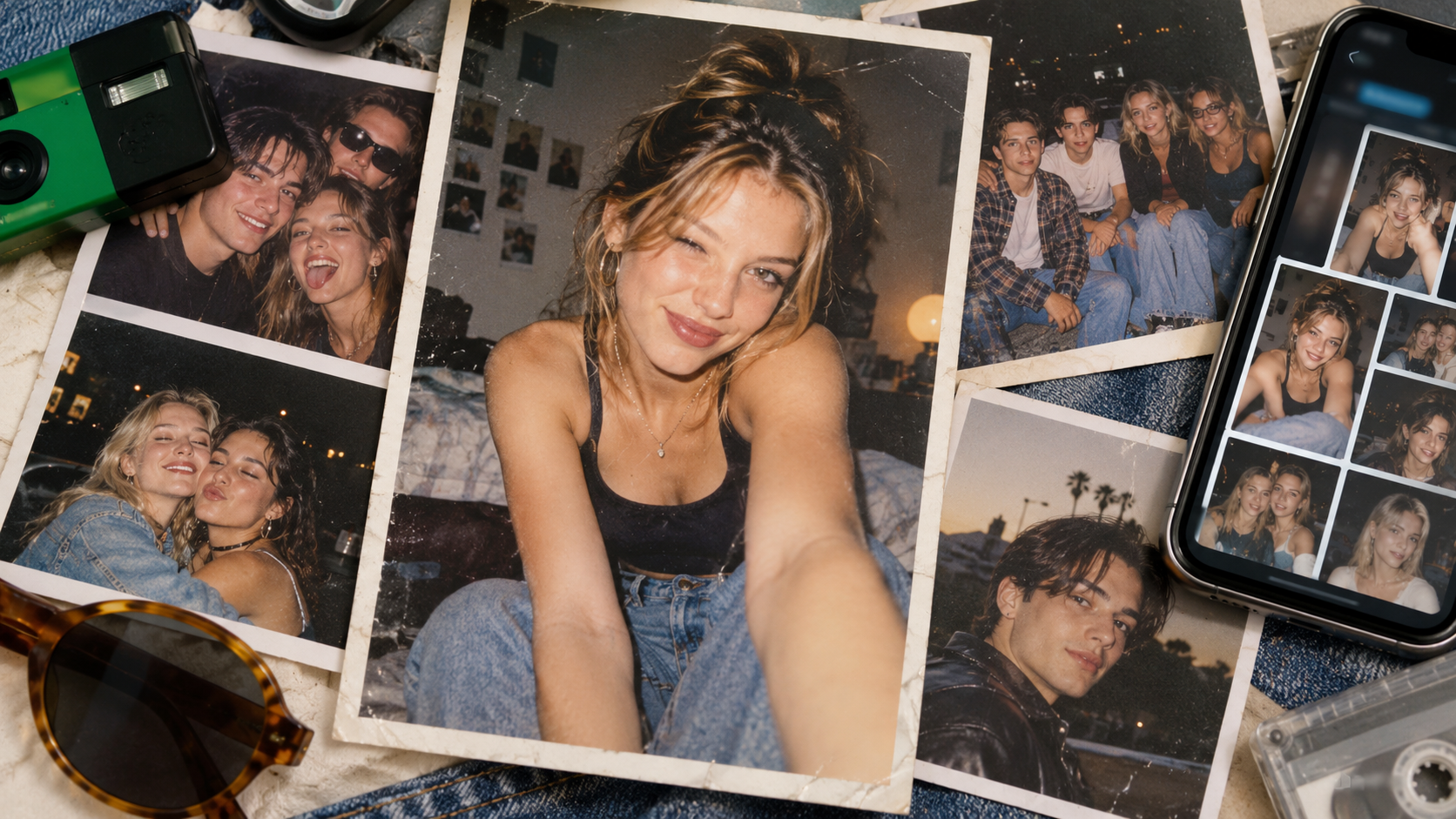
Following a wave of viral 1980s-style photos, ChatGPT and Gemini users have begun experimenting en masse with the aesthetics of the 1990s and early 2000s. Social media is now filled with portraits featuring direct flash, film grain, faded colours, vintage photo studios and Y2K-style imagery. All it takes to create such images is a single photo and a well-formulated prompt.
Briefly about the main points
- Following the 1980s trend, AI-generated photos in the style of the 1990s are circulating on social media.
- Popular images featuring direct flash, film-like grain and faded colours.
- To create a photo, simply upload a portrait to ChatGPT or Gemini.
- In your request, you should ask for the facial features to be retained and only the style to be changed.
- The trend is already spilling over into the aesthetics of the early 2000s.
What is the 1990s-style AI photo trend?
The new format was a continuation of a popular trend a photo in the style of the 1980s, which went viral on social media. Now users are transporting themselves back to the 1990s.
Characteristic features of this style include direct flash, analogue grain, muted colours, old photo studios, home interiors and clothing typical of the era. Unlike a standard filter, AI can alter hairstyles, clothing, backgrounds, lighting and the style of the shot, whilst still keeping the person recognisable.
How to give your photo a 1990s look
The easiest way is to upload a clear portrait to ChatGPT or Gemini and describe the result you’re looking for. It’s best to use a photograph where the face is clearly visible, with no heavy shadows or large objects in front of the person.
The basic query can be formulated as follows:
Turn my uploaded photo into a realistic portrait in the style of the 1990s. Retain my facial features, appearance, skin tone, eye shape and natural expression. Change only the hairstyle, clothing, accessories, background, lighting and shooting style. The photo should look as though it was actually taken in the 1990s: direct flash, slight film grain, slightly faded colours and natural imperfections. Avoid a modern digital look and excessive retouching.
Request No. 1: a classic 1990s photography studio
This option mimics old studio portraits.
Create a realistic studio portrait from the early 1990s based on my photo. Keep my face and recognisability. Add a soft blue-grey studio background, a direct flash, slightly faded colours, a subtle film grain, and clothing and hairstyles typical of that era. The image should look like a genuine printed photograph from 1993, not a modern digital stylisation.
Request No. 2: a photo taken with a film «point-and-shoot» camera»
Another popular option is a photo taken at home that looks as ordinary as possible.
Turn my photo into a random shot from a 1990s film compact camera. Keep my face and body proportions. Use a harsh built-in flash, a slightly darker background, soft focus, realistic film grain, period clothing and an imperfect composition. The result should look like a genuine photo from a family album.
Request No. 3: a portrait of a teenager from the 1990s
Make it look as though this photo was taken in 1997. Keep my appearance and facial features the same. Add a hairstyle typical of the late 1990s, casual clothing, a background in the style of a school yearbook or a teenager’s bedroom, a direct flash, muted colours and a slight film grain. The lighting should be natural and slightly imperfect.
Enquiry No. 4: the early 2000s
Nostalgia is gradually extending to the aesthetics of the early 2000s.
Turn my uploaded photo into a realistic picture from the early 2000s. Keep my face unchanged. Add hairstyles, clothing and accessories from that era, a compact digital camera effect, a strong built-in flash, some slightly overexposed areas, a cooler colour tone and a slight digital noise. The photo should look as though it was taken between 2002 and 2005.
Request No. 5: a 2000s-themed party
Create a realistic photo of a house party from the early 2000s based on my image. Keep my appearance the same. Use a cheap digital camera effect, a harsh flash, a dark background, slightly overexposed faces, imperfect framing and typical early 2000s clothing. Avoid cinematic lighting and modern smartphone-style sharpness.
How to make the result look more realistic
The main problem with these kinds of images is that the AI sometimes alters the face too drastically.
Therefore, the request should explicitly state:
«Keep my appearance and facial features exactly as they are.».
It’s also best to ask the photographer not to make the image too clean or cinematic. It’s the grain, the harsh flash, the slightly off exposure and the vintage colours that give it that authentic photographic feel.
Another useful tip is not to start from scratch after the first generation, but to change individual details: the hairstyle, the background, the clothes or the camera style.
Why do retro AI trends work so well?
The popularity of such photos stems from a combination of nostalgia and personalisation. The user sees not just a stylised image, but an alternative version of themselves — the way they might have looked 20 or 30 years ago. That is precisely why, after the 1980s, the trend naturally moved on to the 1990s and the early 2000s.
For social media, this is almost the ideal format: the result is easy to replicate, it makes you want to share it, and each new era generates a fresh wave of content.